Day 6 Task: File Permissions and Access Control Lists
Hey there! I am Rohit !! I started writing articles on my DevOps and cloud journey👩🏻💻. My purpose is to share the concepts that I learn, the projects that I build, and the tasks that I perform regarding DevOps. Welcome to my blog!!
Today is more on Reading, Learning and Implementing File permissions.
File Permissions:-
- Read (r) Read permission is used to access the file's contents.
Write (w) Write permission allows you to modify or change the contents of a file.
Execute (x) Execute permission allows you to execute the contents of a file.
Access Control Lists:-
This type of situation is what Linux Access Control Lists (ACLs) were intended to resolve. ACLs allow us to apply a more specific set of permissions to a file or directory without (necessarily) changing the base ownership and permissions.
The concept of Linux File permission and ownership is important in Linux. Here, we will be working on Linux permissions and ownership and will do tasks on both of them. Let us start with the Permissions.
Create a simple file and do
ls -ltrto see the details of the files.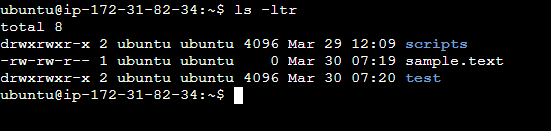
Each of the three permissions is assigned to three defined categories of users. The categories are:
owner — The owner of the file or application."chown" is used to change the ownership permission of a file or directory.
group — The group that owns the file or application.
"chgrp" is used to change the group permission of a file or directory.
others — All users with access to the system. (outised the users are in a group)"chmod" is used to change the other user's permissions of a file or directory.
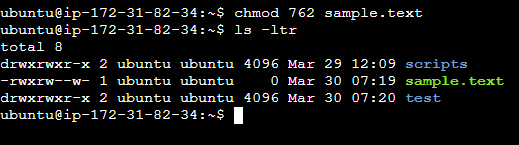
Task:- As a task, change the user permissions of the file and note the changes after
ls -ltr
Here in the sample.txt, the user has only read, and write permission so we can add execute permission also let's see how it's easy.
getfacl displays the comment header, base ACL (access control list) entries, and extended ACL entries, if there are any, for each file that is specified. It also resolves symbolic links. You can specify whether to display access, file default, or directory default. You can also change the default display format.
setfacl sets (replaces), modifies, or removes the access control list (ACL) to regular files and directories. It also updates and deletes ACL entries for each file and directory that was specified by path. If path was not specified, then file and directory names are read from standard input (stdin). In this case, the input should give one path name per line.
I hope this blog has helped you all. Many more blogs are on the way for our DevOps Journey.
Thank you.