Day 5 Task: Advanced Linux Shell Scripting for DevOps Engineers with User management

Hey there! I am Rohit !! I started writing articles on my DevOps and cloud journey👩🏻💻. My purpose is to share the concepts that I learn, the projects that I build, and the tasks that I perform regarding DevOps. Welcome to my blog!!
Tasks
You have to do the same using Shell Script i.e using either Loops or command with start day and end day variables using arguments -
So Write a bash script createDirectories.sh that when the script is executed with three given arguments (one is directory name and second is start number of directories and third is the end number of directories ) it creates specified number of directories with a dynamic directory name.

Here, $1 represents the first argument i.e test
$2 represents the second argument i.e 1
$3 represents the third argument i.e 5
Let's see the practical:-
we have created for loop where the value of i will start from the second argument i.e 1(i=$2) and will go on incrementing (i++) till its value is smaller than or equal to argument 3 which is 5 (i<=$3).
We have executed the mkdir command which will create the directory by taking the value of the first argument i.e test( $1).
echo is used to print the output
Let's execute the above script :

Create a Script to back up all your work done till now.
Here is the script:-
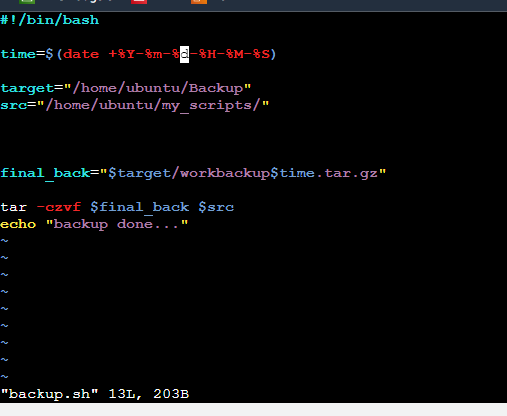
now its time to break down the script
time - it takes the current date and time
target- this is the path where we need backup our files
src- this is the path where all data kept
final_back- It's set the name of the backup files
tar -czvf - used to create the backup
Let's run the script and check the output:-

Create 2 users and just display their Usernames.

for displaying the name of the user you can use the below command
cat /etc/passwd

I hope this blog has helped you all to move towards the automation approach.
Many more blogs are on the way for our DevOps Journey.